5 Things Beginners Should Know Before Starting as a Streamer
Motherboards ,
Graphics Cards ,
Peripherals
Are you a beginner in the world of streaming? If so, now is the time to get started. While it can be exciting to set up your stream and jump right into broadcasting, certain steps should be taken first in order to ensure a successful and enjoyable experience. From setting goals to choosing an optimal setup, here are five essential things every novice streamer should know before they start streaming.
1. Set Goals Before You Begin
Before you begin streaming, it is important for you to identify your goals and build your streaming brand around it. Knowing why you want to stream, as well as who you want in your community, is important for determining how you will need to market your channel.

Once you have identified your “why,” take time to plan out the following:
- Channel Name - Take your time coming up with a strong Twitch channel name. Make sure that it encompasses who you are, what your content is, and will be easy for people to remember. You should also ensure that it is unique, not only on Twitch, but on other platforms. You can use a tool like Namechk to ensure that you can get the social names you want associated with your brand.
- Content - Consider the type of content you will want to stream. What games will you want to play? What types of jokes will you tell? How much of your personal life will you want to share with your community? Having a plane beforehand will help with your overall branding
- Audience - Who do you want to watch your game streaming? While many streamers believe they should market to all people, it isn’t practical. Instead, think about the types of people you enjoy spending time with in real life and plan your content to appeal to that type of person. You will need to engage with your audience every time you stream and you want to ensure that they are people that you want to spend time with.
2. Select Your Streaming Hardware
When you decide to start streaming, you should have the right equipment that will help you smoothly run your channel. You will need a strong and capable streaming setup to make this happen. Here is the streaming hardware you’ll need:
CPU
Choose a central processing unit (CPU) that can handle streaming processes. Today, you have the option between Intel and AMD cores.
You can go for one of the following latest CPU cores:
Intel i5-13500 Features:
- 14 total cores: 6 performance cores and 8 efficient-cores
- 20 Threads
- Max Turbo Frequency 4.8 GHz
AMD Ryzen 5 7600 Features:
- 6 CPU cores
- 12-thread traditional multi-core processor
- Max Boost Clock: 5.1GHz
Motherboard
Your motherboard will house all of the other components for your PC. You should choose a motherboard that is compatible with your chosen CPU and other hardware as well. Here are a couple of motherboards you can get as a beginner:
Intel - MAG B760M MORTAR WIFI
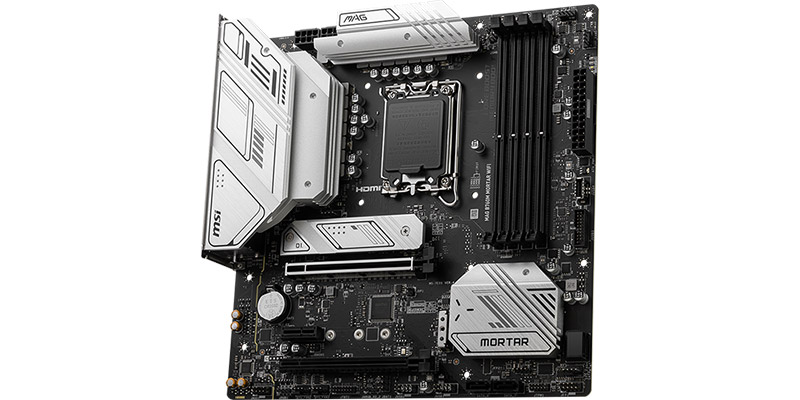
Features:
- Lightning Fast Game experience: PCIe 5.0 slot, Lightning Gen 4 x4 M.2, USB 3.2 Gen 2x2
- Supports DDR5 Memory, up to 7000+(OC) MHz
- Premium Thermal Solution: Extended Heatsink Design and M.2 Shield Frozr are built for high-performance system and non-stop works
- Enhanced Power Design: 12+1+1 Duet Rail Power System, dual 8-pin CPU power connectors, Core Boost, Memory Boost
AMD - MAG B650M MORTAR WIFI

Features:
- Premium Thermal Solution: Extended Heatsink Design and M.2 Shield Frozr are built for high-performance system and non-stop works
- 2.5G LAN and AMD Wi-Fi 6E Solution: Upgraded network solution for professional and multimedia use.
- Lightning M.2: Running at PCIe Gen 4 maximizes performance for NVMe based SSDs
- Lightning USB 20G: Built-in USB 3.2 Gen 2x2 port, offers 20Gbps transmission speed, 4X faster than USB 3.2 Gen 1
- Enhanced Power Design: 12+1+1 Duet Rail Power System, dual 8-pin CPU power connectors, Core Boost, Memory Boost
Both options will help you run your games and streaming software.
GPU
Since you will be streaming your gameplay, you will need a powerful GPU that can render the game’s graphics. Here’s a GPU we can recommend for beginners:
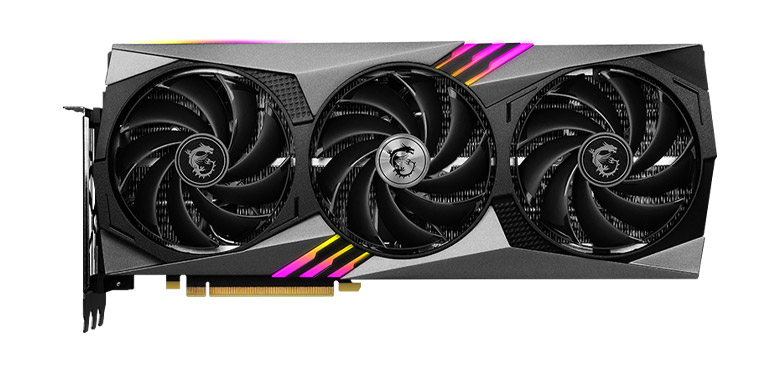
This is one of the best GPUs you can get when you’re just starting out in streaming. It has a premium build and fans that will help with the cooling of your GPU. This GPU also comes with MSI’s Mystic Lights. You can control these lights to customize it according to your streaming setup and aesthetic.
Features:
- AI-accelerated performance with DLSS 3
- 12GB GDDR6X
- Dual BIOS gives you the choice to prioritize full performance in GAMING mode or low noise in SILENT mode.
- TORX Fan 5.0: Fan blades linked by ring arcs and a fan cowl work together to stabilize and maintain high-pressure airflow.
Memory
Your random access memory (RAM) is also important computer hardware, especially for streaming. Your RAM will help you run multiple programs simultaneously. So, streamers tend to splurge on this component since you’ll be gaming and streaming the majority of the time.
You can use the following RAM for your streaming PC:
Kingston Fury Beast 6000MT/s 8GB x2
Kingston Fury Beast 6000MT/s 8GB x2
This is one of the best and most beginner-friendly RAMs. It has a great overclocking performance and is compatible with most memory slots today. You also won’t have to worry about it getting too hot with its well-designed cooling features.
Features
- Enhanced RGB lighting with new heat spreader design
- Patented Kingston FURY Infrared Sync Technology
- Improved stability for overclocking
- Plug N Play at 4800MT/s2
3. Select Your Peripherals
You will also need other items aside from your PC build to stream. You will want a decent monitor or display that will perform well when gaming. This goes the same for your keyboard, mouse, and headphones. These pieces of equipment are great investments for both gaming and streaming.
Apart from that, having good quality webcam and microphone. While you can use the built-in microphone on your headset, having a separate one can improve your stream’s audio quality.
Here are a couple of gaming peripherals we recommend for novice streamers:
Monitor: Optix MAG241C
Monitor: Optix MAG241C
Most gamers and streamers prefer a monitor display with at least a 144Hz refresh rate. Gaming is generally better with this refresh rate especially during crucial moments in a game.
he MAG241C is a curved display with FHD resolution and true color capabilities. It has a beautiful frameless design that effortlessly makes it look clean and modern.
Features:
- Curved display
- 178° wide view angle
- FHD High Resolution
- True color
- 144Hz refresh rate
- 1ms response time
- AMD FreeSync™ Premium Technology
- Anti-Flicker and Less Blue Light
Keyboard: MSI VIGOR GK50 ELITE KAILH BLUE

Every gamer wants to have a decent keyboard for gaming. It helps in tactile feel and can sometimes make or break your gameplay.
The VIGOR GK50 ELITE KAILH BLUE is a mechanical RGB keyboard that not only looks good on your gaming desk but also has an amazing feel to it when gaming and just typing in general. A gaming base is also built into this keyboard that reduces its flex, making it a far more stable keyboard for gaming.
- Brushed metal top plate
- Per-key RGB lighting
- Mechanical switches
- Numpad
- Gaming base
Gaming Mouse: CLUTCH GM41 LIGHTWEIGHT V2 & CLUTCH GM41 LIGHTWEIGHT WIRELESS
A reliable gaming mouse will also be beneficial for streaming. You can choose between a wired or wireless mouse.
Features for wired mouse: CLUTCH GM41 LIGHTWEIGHT V2
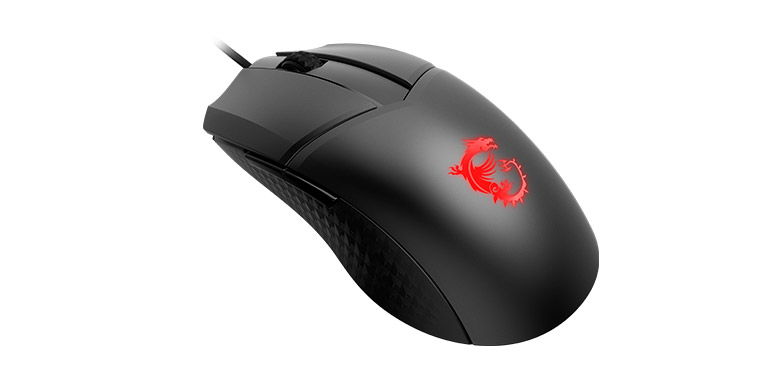
This mouse has a symmetrical shape that is great for both left and right-hand gamers. Moreover, the 65g lightweight design reduces fatigue when long-time streaming.
- 65g lightweight
- Up to 16000 DPI with a 1ms Polling Rate
- Diamond-Patterned Anti-Slip
- 5-level preset DPI
- MSI FriXionFree Cable
Features for wireless mouse: CLUTCH GM41 LIGHTWEIGHT WIRELESS
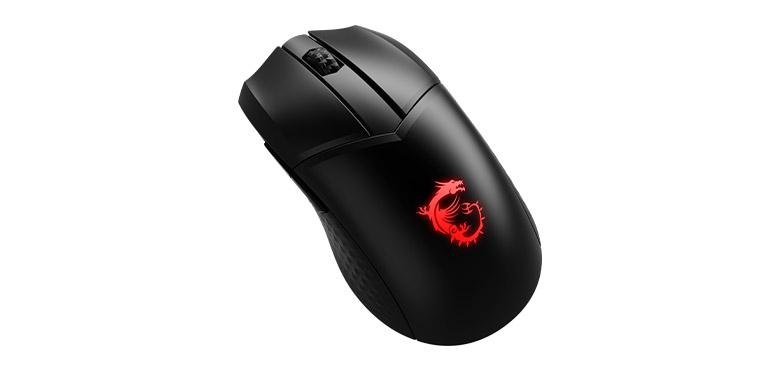
The GM41 is proud of its lightweight design. It has a battery life of up to 80 hours and a 20,000 DPI
- 74g lightweight
- Up to 20000 DPI with a 1ms Polling Rate
- Diamond-Patterned Anti-Slip
- Up to 80 hours of battery life
- MSI charging dock included
Headphones: MSI DS502 GAMING HEADSET
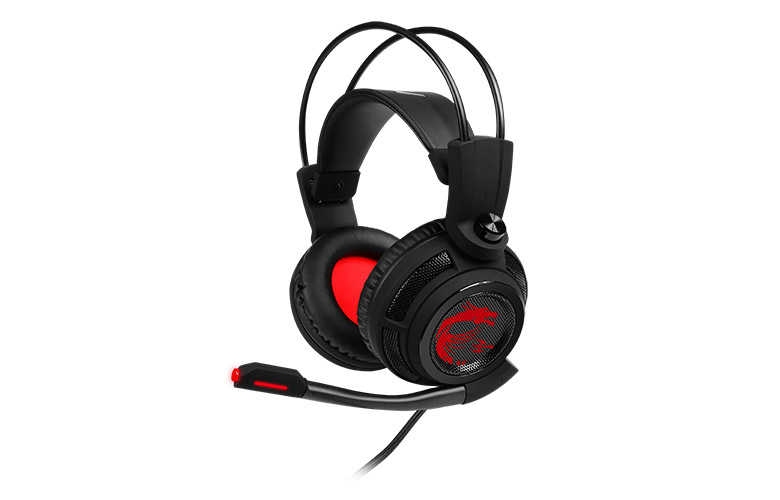
Your headphones are important for in-game communication. It’s ideal to invest in a good pair that will last you a couple of years and provides good quality sound. The DS502 is a great option for this.
- Intelligent Vibration System
- 40mm High-Quality Drivers
- LED lights
- Self-adjusting Headband
Webcam: Logitech C922 Pro HD Stream WebCam
Viewers are more likely to watch and stay on streams when they can see you. Having a webcam with good image quality will help bring in new viewers and encourage your current ones to return to your channel.
- HD 720p at 60fps or Full 1080p at 30fps
- 78° diagonal field of view
- Auto light correction
- 2 omnidirectional mics
- Comes with a tripod
Microphone: MSI IMMERSE GV60 STREAMING MIC

A high-quality microphone will help you communicate with your teammates in-game and with your viewers watching your streams. Having good audio quality is a big factor in gaining more views and becoming a successful streamer. Also, the mounting ready design made with a 5/8" threading and a 3-meter USB cable make the setup on a boom arm an easy process, allowing for more convenient desktop layout and use for livestreamers.
- High resolution sample rate: 24bit/96kHz
- 4 pickup patterns
- Real-time monitoring
- Plug & play with on-mic controls
- Mounting ready design
4. Download Streaming Software
After you have set up your streaming PC, you will need to install the right software to allow you to stream easily. While there are several popular options for streaming software for Twitch, OBS Studio is the most popular choice. This software is open source and absolutely free. It also has a strong community around it that will help you with any trouble-shooting issues.
After your OBS download, you will be able to set up how your channel will look. You will be able to set up how your stream will look. You can add feed from your webcam over your gameplay and add graphics, such as Twitch overlays or even CTAs to your other socials.
You can also add widgets that will allow you to interact with your stream, display alerts when they follow or subscribe, and more. Take your time as you set things up to make your channel look professional.

5. Plan to Create Good Content
At the end of the day, while your graphics and visuals are important, people will only stay on your channel if they find your stream entertaining. For that reason, it is important for you to take the time to plan out strong content that will keep people watching.
Here are a few ideas to get you started on your journey:
- Stream Titles - Before someone clicks on your channel, there is very little for them to go by. They will be able to see a small thumbnail of your stream and your stream title. Taking the time to come up with a creative title may entice them to pick your channel over the others in your category.
- QOTD - Come up with some good “Questions of the Day” that you can use on your channel. Good QOTD ideas can generate conversation in your chat which will help with the overall Twitch algorithm. It will also help newcomers feel comfortable talking to others in your community.
- Keep Chatting - If you have frequented many smaller Twitch channels, you have likely come across somewhere the streamer wasn’t engaging. Many times, streamers remain quiet and just play a game. Often, you’ll notice that there are fewer than 5 active viewers in their channel. It is important for you to entertain your viewers by chatting to them, telling them stories, talking about what you are doing in your game, and more.
Monetize Your Channel
The most common way to monetize your Twitch channel is through Twitch subscriptions and bits. Viewers can subscribe to your channel to unlock special perks (such as avoiding ads, getting channel emotes, and more). As the streamer, you would receive 50% of these proceeds. Viewers can also purchase “bits” from Twitch and donate those to your channel. You will get a Twitch payout once you have earned $100 USD worth of donations.
Alternatively, you can set up alternative donation methods, such as providing your PayPal account through a third-party cloudbot or working with Twitch sponsors or affiliate programs. The larger you grow your channel, the more opportunities you’ll have to earn from your stream.
Conclusion
Without setting goals, selecting hardware and peripherals, downloading streaming software, and planning to create good content, growth as a streamer can be challenging. To be successful, first-time streamers should take the time to research and plan for each stage of their journey. Doing so can ensure that you maximize your potential to create a successful long-term career. Most importantly, you will want to build an authentic identity and cultivate relationships with your community in order to expand your reach and turn streaming into something more than just a hobby.
Learn More:
A Comparison of the Top Streaming Platforms: Which One is Right for You?
How to Start Streaming on Twitch (PC Guide)
Building the Mainstream Streaming PC: Tips and Tricks for a Top-Tier Setup
A Comparison of the Top Streaming Platforms: Which One is Right for You?
How to Start Streaming on Twitch (PC Guide)
Building the Mainstream Streaming PC: Tips and Tricks for a Top-Tier Setup

Chris Grayson is the founder of streamscheme.com, a website devoted to helping content creators build successful online businesses.
He has a content and influencer coaching background, and he uses this knowledge to design actionable advice for new and intermediate streamers.