How do Dual Mode and AI Menu enhance your game experience?
Monitors
What’s Dual Mode?
Dual Mode is an innovative feature introduced to gaming monitors in recent years, offering different refresh rates at different resolutions to suit various gaming needs.
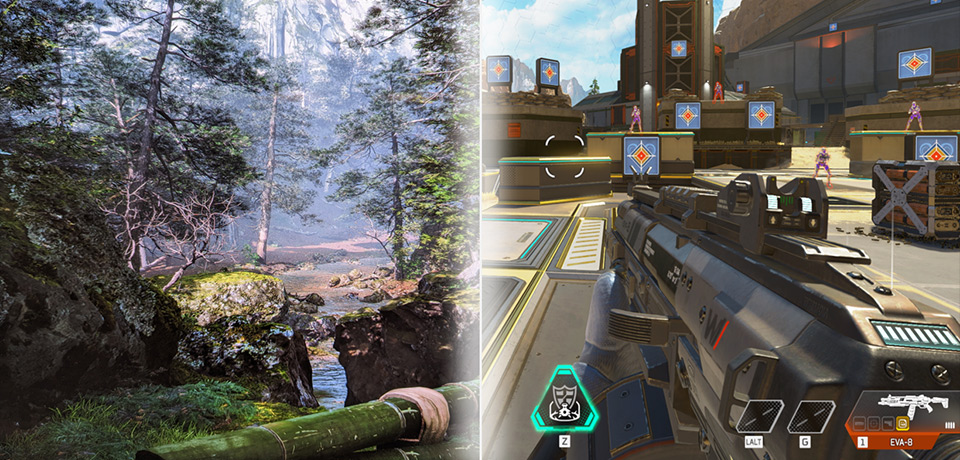
AAA Games:
These games emphasize visual fidelity and rich, detailed environments. Therefore, higher resolution (like 4K) takes priority, even if the refresh rate is lower.
PvP / Competitive Games:
In fast-paced titles where reaction time is crucial, a higher refresh rate is more valuable than resolution. Since players focus on quick movements and split-second decisions, ultra-high resolution is less important during gameplay.
Dual Mode allows gamers to easily switch between these modes—optimizing for either visual quality or performance, depending on the game. Designed to meet gamers' needs when switching between different types of games.
How does Dual Mode work?
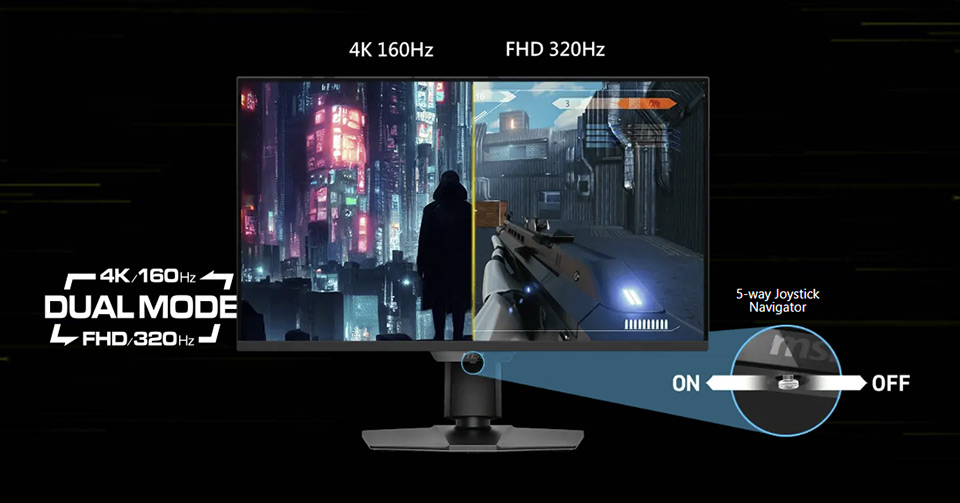
To accommodate the gaming scenarios mentioned above, we’ve essentially designed the Dual Mode to offer FHD with a high refresh rate, and 4K with a lower refresh rate. When playing PvP games, set the monitor to FHD to maximize performance and achieve the highest possible FPS. This gives you clearer visuals and faster reactions during gameplay. For AAA games, switch to 4K to fully experience the game as the developers intended—rich in detail and story, immersing you in the world they’ve worked hard to create.
MSI Makes Dual Mode Easy to Use
If a monitor supports Dual Mode but requires you to change the resolution and refresh rate in Windows settings manually, it's not a user-friendly experience.
That’s why MSI designed a smarter, more convenient solution. With MSI monitors, you can quickly toggle Dual Mode by simply moving the joystick—no need to dig into system settings. This intuitive design makes it effortless to switch between high-resolution and high refresh rate modes, giving you full control in just one step.
Sliding the joystick to activate the quick access Dual Mode menu.
- Move the joystick to turn on Dual Mode and the monitor will switch to FHD.
- Move the joystick again to turn off Dual Mode, and the monitor will switch to 4K UHD.
- Move the joystick to turn on Dual Mode and the monitor will switch to FHD.
- Move the joystick again to turn off Dual Mode, and the monitor will switch to 4K UHD.
AI Menu and AI Dual Mode Make Your Monitor Smarter
MSI has designed several AI features to make using the monitor easier and more intuitive, catering to each individual's unique needs.
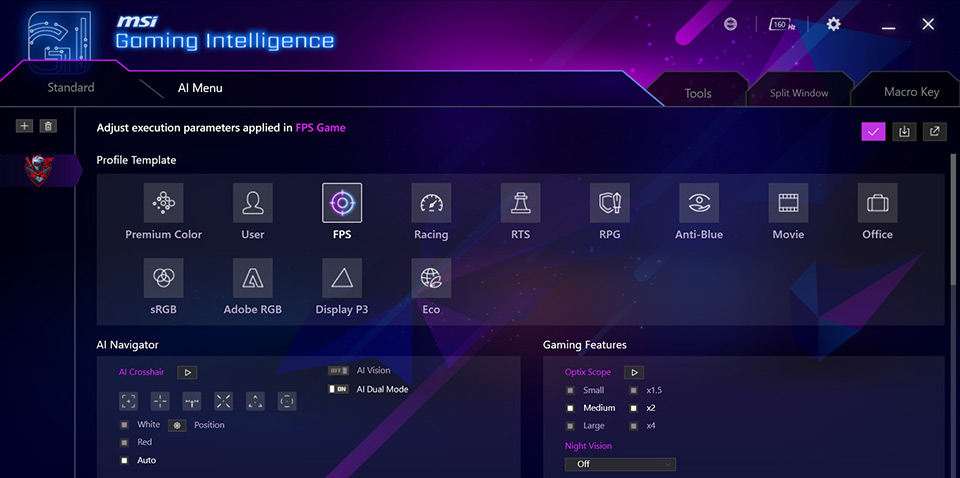
One of these is the AI Menu, an exclusive feature within the Gaming Intelligence app. AI Menu allows you to personalize your experience in Gaming Intelligence like never before. With it, you can customize monitor settings that will auto-activate when a specific game launches. For example, you can select particular color settings, brightness, Optix Scope, etc., in different games. This allows you to effortlessly use your preferred settings across various games.
In addition, MSI designed the AI Dual Mode. One of its benefits is that it detects resolution settings and automatically adjusts them to the optimized refresh rates when switching between modes. For example, if you set your monitor to 4K at 120Hz, switching to FHD mode will automatically adjust to 240Hz, rather than 60Hz, which would require you to adjust it again, ensuring a balanced experience without extreme steps.
When used together with Gaming Intelligence and AI Menu, another benefit of AI Dual Mode lets you switch between different resolutions seamlessly, without using the joystick manually. Gamers can decide when and which games or applications to match with different scenarios.
One of these is the AI Menu, an exclusive feature within the Gaming Intelligence app. AI Menu allows you to personalize your experience in Gaming Intelligence like never before. With it, you can customize monitor settings that will auto-activate when a specific game launches. For example, you can select particular color settings, brightness, Optix Scope, etc., in different games. This allows you to effortlessly use your preferred settings across various games.
In addition, MSI designed the AI Dual Mode. One of its benefits is that it detects resolution settings and automatically adjusts them to the optimized refresh rates when switching between modes. For example, if you set your monitor to 4K at 120Hz, switching to FHD mode will automatically adjust to 240Hz, rather than 60Hz, which would require you to adjust it again, ensuring a balanced experience without extreme steps.
When used together with Gaming Intelligence and AI Menu, another benefit of AI Dual Mode lets you switch between different resolutions seamlessly, without using the joystick manually. Gamers can decide when and which games or applications to match with different scenarios.
Gaming Intelligence app installation guide:
https://www.msi.com/support/technical_details/MNT_SW_MSI_Preloaded_Software
Download the Gaming Intelligence app:
https://download.msi.com/uti_exe/monitor/Gaming-Intelligence-x64.zip
https://www.msi.com/support/technical_details/MNT_SW_MSI_Preloaded_Software
Download the Gaming Intelligence app:
https://download.msi.com/uti_exe/monitor/Gaming-Intelligence-x64.zip
MSI Gaming Monitors AI Menu & Dual Mode Support List:
Dual Mode Series
AI Menu Support
MPG 274URDFW E16M
O
MAG 322URDF E16
O
MAG 272URDF E16
O
MAG 274UPDF E16M
X
MAG 275UPD E14
X
MAG 321CUPDF
X
For more information please visit the product pages.
MPG 274URDFW E16M:
https://www.msi.com/Monitor/MPG-274URDFW-E16M
MAG 322URDF E16:
https://www.msi.com/Monitor/MAG-322URDF-E16
MAG 272URDF E16:
https://www.msi.com/Monitor/MAG-272URDF-E16
MAG 274UPDF E16M:
https://www.msi.com/Monitor/MAG-274UPDF-E16M
MAG 275UPD E14:
https://www.msi.com/Monitor/MAG-275UPD-E14
MAG 321CUPDF:
https://www.msi.com/Monitor/MAG-321CUPDF
MPG 274URDFW E16M:
https://www.msi.com/Monitor/MPG-274URDFW-E16M
MAG 322URDF E16:
https://www.msi.com/Monitor/MAG-322URDF-E16
MAG 272URDF E16:
https://www.msi.com/Monitor/MAG-272URDF-E16
MAG 274UPDF E16M:
https://www.msi.com/Monitor/MAG-274UPDF-E16M
MAG 275UPD E14:
https://www.msi.com/Monitor/MAG-275UPD-E14
MAG 321CUPDF:
https://www.msi.com/Monitor/MAG-321CUPDF