AMD Ryzen 9 9950X3D, 9900X3D, and Ryzen 7 9800X3D Upgrade Guide: Best Picks for your X870 Workstations and Gaming PCs
Motherboards
AMD’s X3D processors have dominated the gaming charts for a few years. With the release of the AMD Ryzen 9 9950X3D and the Ryzen 9 9900X3D, it is rounding out its lineup to ensure top-tier workstation performance alongside its incredible gaming performance.
However, more enticing processors on shelves does make your choice a bit more confusing. Do you go with a Ryzen 7 9800X3D? Or is a top-of-the-line Ryzen 9 9950X3D better value for you?

As with many things, it depends.
For those who want a quick recommendation, here you go:
- If you regularly handle workstation tasks or heavy compute tasks (video editing, 3D rendering, 3D modelling, etc.) and don’t want to compromise on gaming performance to get workstation-class performance, grab a Ryzen 9 9950X3D. It should allow you to experience the best of both worlds.
- If you mostly play games on your PC and love high FPS numbers, a Ryzen 7 9800X3D will give you better bang for your buck. On a budget, the Ryzen 7 7800X3D from AMD’s last-gen offerings is still a compelling option in some regions.
Whether you’re a gamer looking for buttery-smooth frame rates, a creator chasing lightning-fast render times, or an AI researcher hoping to handle more complex, larger models, we’ll decode AMD’s latest offerings and find your perfect match.
AMD Ryzen 9000X3D Architectural Improvements: Better and Faster in Every Way
While AMD’s last-gen X3D offerings (7000X3D) are still impressive for gaming, the higher core-count processors with 3D V-Cache suffered some performance issues. However, with the Ryzen 9000X3D lineup, AMD has made several microarchitectural improvements that alleviate many of those drawbacks.
CPU Name
Graphics Model
Cores/ Threads
Base / Max.
Boost Clock
Boost Clock
L2+L3 Cache
Default TDP
AMD Ryzen™ 9 9950X3D
AMD Radeon™ Graphics
16 / 32
4.3 / 5.7 GHz
144MB
170W
AMD Ryzen™ 9 9950X
AMD Radeon™ Graphics
16 / 32
4.3 / 5.7 GHz
80MB
170W
AMD Ryzen™ 9 9900X3D
AMD Radeon™ Graphics
12 / 24
4.4 / 5.5 GHz
140MB
120W
AMD Ryzen™ 9 9900X
AMD Radeon™ Graphics
12 / 24
4.4 / 5.5 GHz
76MB
120W
AMD Ryzen™ 7 9800X3D
AMD Radeon™ Graphics
8 / 16
4.7 / 5.2 GHz
104MB
120W
AMD Ryzen™ 7 9700X
AMD Radeon™ Graphics
8 / 16
3.8 / 5.5 GHz
40MB
65W
For gamers and creators, this means:
- You can access the full potential of AMD 3D V-Cache technology’s gaming prowess, even in 16-core CPUs like the Ryzen 9 9950X3D.
- You don’t miss out on a chunk of workstation performance compared to AMD’s standard Ryzen 9000 processors.
Here’s a quick look at the specifications for AMD’s Ryzen 9000X3D processors. As expected, they’re compatible with existing AM5 motherboards, but you might want to hop to a newer platform to access more powerful features and bandwidth for workstation tasks.

Recommendations
- AMD Ryzen 9 9950X3D: This 16-core, 32-thread behemoth from AMD combines the best workstation and gaming performance into a single package. This is the perfect pick if you need incredible performance in both areas.
- AMD Ryzen 9 9900X3D: This 12-core, 24-thread processor is a slightly weaker version of its 16-core sibling above. It’s a great pick if you want a more budget-friendly version of the 9950X3D without giving up too many cores.
- AMD Ryzen 7 9800X3D: The current gaming performance champion is no stranger to workstation tasks, but it will be outclassed by the AMD Ryzen 9 offerings when it comes to workloads where multiple CPU cores matter with its 8 cores. If you want the best processor for just gaming, this is a pretty safe pick.
Factors to Consider When Picking Motherboards for AMD Ryzen 9 9950X3D, Ryzen 9 9900X3D, or Ryzen 7 9800X3D
If you’ve settled on one of the higher core count processors in AMD’s product lineup, you’ll want to handle CPU-intensive workloads regularly. A reliable, high-end platform will help you get the most out of your brand-new CPU without sacrificing performance in any area.
Processors like the Ryzen 9 9950X3D have unlocked a new class of hybrid workstation and gaming PCs that just weren’t possible before. You can enjoy the best gaming AND workstation performance with a single PC – allowing you to allocate your budget more effectively than building separate machines for work and leisure.
Although these new processors are compatible with the vast ecosystem of AM5 motherboards, there are a few factors to consider before making your pick.
Workloads: What do You Need to Run?
Workstations are usually purpose-driven machines – built to excel at a specific type of task or workload. This hasn’t changed too much with modern workstations.
For example, if your workload is equally GPU and CPU heavy, you’ll not only want a motherboard with several PCIe slots to run multiple graphics cards, but you’ll also need PCIe bifurcation to make sure you get the best possible performance out of all your GPUs.
Similarly, for CPU-heavy tasks, you’ll want to ensure that your motherboard can reliably handle and deliver the power your powerful processor needs to sustain peak CPU performance for as long as possible. Here, you’ll want to opt for motherboards with more power phases, higher quality chokes, intelligent thermal designs, etc.
Budget: What to Spend and Where to Spend?
Even with high budgets, it’s possible to overspend on components that don’t benefit the type of performance you need. For example, if your workloads are heavily CPU-dependent, then the budget allocation for your CPU should be much higher than, say, your GPU, and vice versa.
Next, you should ensure that your high-end PC is built on a solid foundation – a feature-rich, reliable platform (motherboard) and a rock-solid power supply to power your precious hardware safely.
X870E vs. X870 vs. B850 Motherboards for AMD Ryzen 9 9950X3D and Below
Regardless of CPU or GPU-heavy tasks, you’ll want to pick a top-tier platform like X870E (or X870) to unlock the full potential of your hardware and a reliable, modern power supply to ensure your hardware’s safety.
Similarly, if you’re building a more mid-range machine geared towards gaming than workstation tasks, a more value-oriented offering like B850 is a good choice. You’ll find a more detailed look at these platforms and their features in our dedicated article comparing X870E, X870, and X670 motherboards!

AMD Ryzen 9 9950X3D + MEG X870E GODLIKE: Max Performance. No Compromises.
The MEG X870E GODLIKE motherboard from MSI’s 800-series lineup for Ryzen 9000 processors is among the most premium offerings on shelves today. It comes equipped with nearly every feature you might need in a top-tier hybrid workstation and gaming PC – allowing you to unleash the full potential of high-end processors like the Ryzen 9 9950X3D.
It is an absolute powerhouse with cutting-edge features and a robust power design for enthusiasts. It features a 24+2+1 Duet Rail Power System to ensure rock-solid power delivery for demanding 16-core CPUs like the Ryzen 9 9950X3D.

A prominent 3.99-inch Dynamic Dashboard III enhances the board's dark aesthetics display to monitor performance and temperatures, personalize to your liking, and more! MSI's Frozr heatsink design and M.2 Shield Frozr ensure optimal thermal performance for high-end components.
Extensive connectivity options include two PCIe 5.0 x16 slots, up to seven M.2 sockets, dual 10GbE and 5GbE LAN ports, and full-speed Wi-Fi 7 support. Like other 800-series motherboards from MSI, the MEG X870E GODLIKE boasts a broad range of EZ DIY features engineered to simplify your PC building experience like never before.
X3D Gaming Mode: Unleashing Performance
MSI’s X3D Gaming Mode is designed to extract the best possible performance from AMD’s Ryzen 9000 series, including Ryzen 9000X3D processors. It can boost your performance in games by up to a whopping 20%!
Latency Killer: Killing DDR5 Latency on AM5
Latency Killer is another performance-focused feature for AMD Ryzen 9000 (X3D) processors that unlocks better performance in games and many latency-sensitive workstation tasks by reducing DDR5 memory latency by up to 12%.
AMD Ryzen 9 9950X3D Benchmarks and Performance: The New Gaming and Workstation Champion!
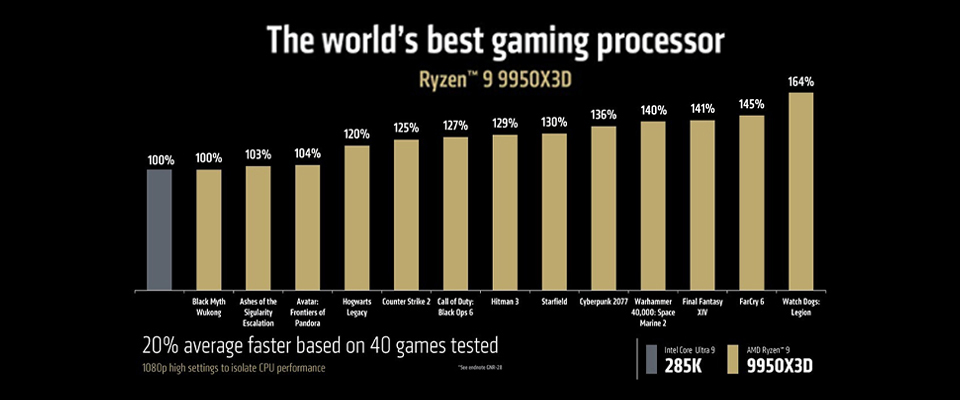
On March 12th, many reputed media outlets released benchmarks for AMD’s 3D V-Cache toting monstrosity with 16 cores and 32 threads. It confirms what we’ve expected from AMD this generation. The Ryzen 9 9950X3D offers the multi-core performance you’d expect from a 16-core processor without sacrificing any gaming performance compared to the reigning gaming champ, the Ryzen 7 9800X3D.
Gaming benchmarks from Techspot and Gamers Nexus confirm the gaming prowess of the Ryzen 9 9950X3D, while Gamers Nexus’ production benchmarks crowns the Ryzen 9 9950X3D as the very best workstation processor on a consumer platform today.
In gaming tests, the Ryzen 9 9950X3D easily keeps up with the Ryzen 7 9800X3D – resulting in a tie. However, in workstation tasks, the Ryzen 9 9950X3D completely obliterates its Ryzen 7 sibling without mercy – offering up to 90% more performance in heavily multithreaded workloads!
No-Compromise Gaming and Workstation PCs
Thanks to AMD’s latest Ryzen 9 9950X3D and Ryzen 9 9900X3D, professionals no longer have to compromise gaming or workstation performance. With these new X3D CPUs, you can enjoy the best possible performance in both areas without caveats.
Of course, you should ensure that your PC build is balanced well with a reliable power supply, a powerful platform, fast storage, and adequate DDR5 memory. You can go over MSI’s product lineups below to find the best possible hardware for your brand-new PC!
Frequently Asked Questions (FAQs)
Will a Ryzen 9 9950X3D be better for gaming?
A: Yes, a Ryzen 9 9950X3D offers a superior gaming experience compared to its non X3D counterpart. Independent testing shows that the Ryzen 9 9950X3D is as fast as the current reigning gaming champ – the Ryzen 7 9800X3D.
Does the Ryzen 9 9950X3D have integrated graphics?
A: Yes. Like other processors in AMD’s Ryzen 9000 lineup, the Ryzen 9 9950X3D and 9900X3D feature integrated Radeon Graphics.
Is the Ryzen 9 9950X3D better than 9800X3D?
A: For workstation tasks, absolutely yes due to the Ryzen 9 9950X3D’s higher core counts. Gaming performance is similar in most cases.
What is the max RAM speed for the Ryzen 9 9950X3D?
A: According to AMD’s official support for its memory controller, the max memory speed is DDR5-5600. Good motherboards and/or memory kits can push higher speeds with overclocking.
Do Ryzen 9000X3D CPUs support DDR4 memory?
A: No. All Ryzen 9000 processors only support DDR5 memory. The memory speed sweet spot for Ryzen 9000 is DDR5-6400 memory due to how AMD’s infinity fabric works. However, any speeds of 6000 MT/s and higher should be close enough.
What are the main differences between Ryzen 9 9950X3D, 9900X3D, and 9800X3D?
A: They offer different core counts. The Ryzen 9 9950X3D boasts 16 cores and 32 threads, coupled with second generation 3D V-Cache, which enables chart-topping gaming and workstation performance. The Ryzen 9 9900X3D has 12 cores and the Ryzen 7 9800X3D has 8 cores.
How does 3D V-Cache impact gaming and productivity performance?
A: Second generation 3D V-Cache boosts gaming performance – allowing processors like the Ryzen 9 9950X3D to deliver workstation-class performance while enabling top-tier gaming performance.
Are Ryzen 9000X3D CPUs fully compatible with AM5 motherboards?
A: Yes. AMD’s long-term support for its socket means these CPUs are fully compatible with all AM5 motherboards. However, higher-end motherboards might be better for processors like the Ryzen 9 9950X3D and 9900X3D as they offer better power delivery, more bandwidth, and superior extensibility.
What is the best motherboard for the Ryzen 9 9950X3D?
A: X870E motherboards like the MEG X870E GODLIKE are a perfect match for the Ryzen 9 9950X3D thanks to features like robust power delivery (24 + 2 + 1 VRM), dual PCIe 5.0 slots, and full-speed Wi-Fi 7 – making it the ideal pick for power users and professionals who cannot compromise on performance or features.