Boost Intel Core Ultra 9 285K Gaming Performance with MSI Memory Extension Mode
Motherboards
MSI Memory Extension Mode optimizes memory settings to deliver higher bandwidth, lower latency, and improved gaming performance.
Designed for Intel Core Ultra processors, Memory Extension Mode introduces a new High-Efficiency Mode, adding to the existing Performance, Benchmark, and Memtest modes.
Users can select the best mode for their system based on their processor's integrated memory controller (IMC) and memory overclocking capabilities.
Memory Extension Mode – Reduces Memory Latency by 12%-16%
Testing with the Intel Core Ultra 9 285K CPU using DDR5-7200 and DDR5-8200 memory at XMP frequencies shows that the High-Efficiency mode in Memory Extension Mode reduces memory latency by an additional 12%-16% over standard XMP configurations.

XMP + Memory Extension Mode – Up to 10% Faster Gaming Performance than XMP, 21% Faster than Default
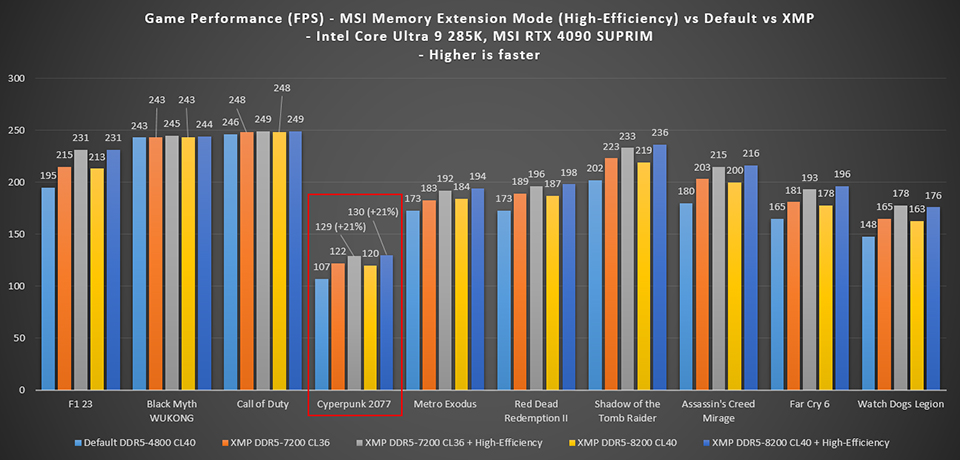
With an RTX 4090 GPU and DDR5-7200 or DDR5-8200 memory, tests demonstrated a 6%-14% increase in 1080p gaming performance with XMP compared to the default DDR5-4800 settings, depending on the game.

Using both XMP and the High-Efficiency Mode, DDR5-8200 memory can further increase gaming performance by 5%-10%, varying by game.
For DDR5-7200 memory, enabling XMP and High-Efficiency Mode together delivers up to 21% performance improvement over default settings.


How to Enable Memory Extension Mode
Starting with the 800-series motherboards, MSI introduces the new Click BIOS X, providing a more user-friendly interface. To activate Memory Extension Mode, enter BIOS (defaulting to EZ Mode), switch to Advanced Mode by pressing F7, and locate the Memory Extension Mode option on the Overclocking page. Select the desired mode from the menu to apply.
System Configuration:
- CPU: Intel Core Ultra 9 285K
- Motherboard: MSI MEG Z890 ACE
- Memory: Galax DDR5-7200 16GBx2 & G.Skill DDR5-8200 24GBx2
- Graphics Card: MSI GeForce RTX 4090 SUPRIM X 24G
- SSD: Kingston SNV2S/2000G
- CPU Cooler: MSI CORELIQUID I360
- Power Supply:MSI MEG Ai1300P PCIE5
- Operating System: Windows 11 24H2 build 26100.2033 (Power Mode: Best Performance)
- Game Settings: Black Myth: Wukong - High, Call of Duty: Modern Warfare II - Balanced; all other games set to maximum quality
Note:
- Performance may vary based on hardware and configuration.
- Results are based on testing with an RTX 4090 GPU; results may differ with other graphics cards.
- Memory Extension Mode involves CPU and memory overclocking, and stability may vary depending on hardware.
- The effect of memory performance on gaming varies by game and GPU used.
MSI Z890 Motherboards: https://www.msi.com/Landing/intel-arrow-lake-core-ultra-z890-b860-h810-best-ai-pc-gaming-motherboard.