MSI PBO BCLK Booster x High-Efficiency Mode: Unleashing Ryzen 7 9800X3D Gaming Performance
Motherboards
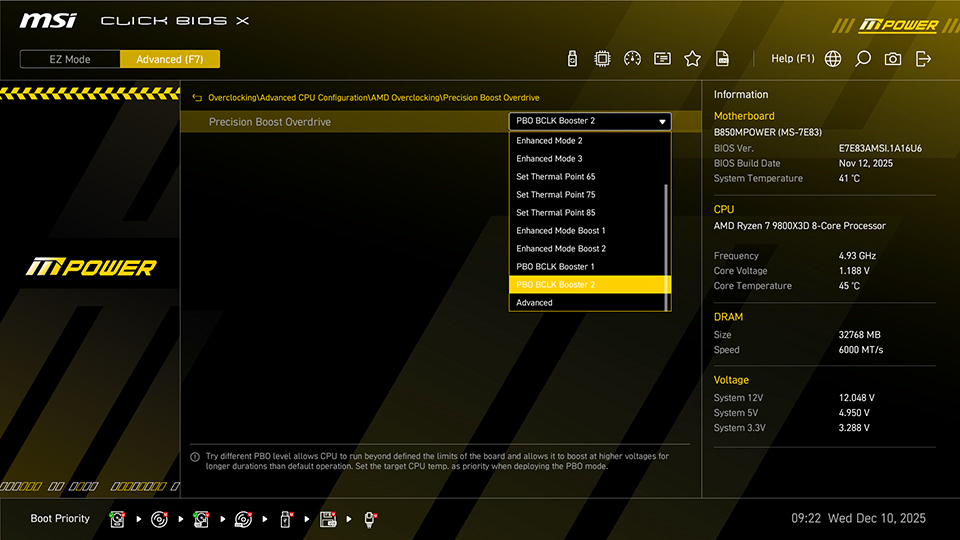
For the latest X870 MAX, B850 MAX series, and B850MPOWER motherboards equipped with MSI OC ENGINE technology, MSI introduces a new BIOS feature - PBO BCLK Booster.
This feature allows users to easily adjust the CPU base clock (BCLK) to improve processor and gaming performance. When combined with MSI memory overclocking and optimization features, gaming performance can be further enhanced.
Easy Performance Boost for CPU and Memory
MSI Click BIOS X provides simple and user-friendly tools to enhance CPU and memory performance. Even users who are not familiar with BIOS settings can boost system performance with just a few clicks. Key features include:
- PBO BCLK Booster: Increases the CPU BCLK to improve overall performance.
- Memory Try It!: Offers multiple memory overclocking profiles that can be applied quickly, reducing the need for manual tuning.
- High-Efficiency Mode: Optimizes memory parameters to increase bandwidth and reduce latency.
PBO BCLK Booster – Boosting CPU Performance
PBO BCLK Booster increases CPU performance by raising the CPU BCLK, which results in higher operating frequencies. Some users may worry that adjusting the BCLK could affect the stability of other system components. However, PBO BCLK Booster only changes the CPU BCLK and does not affect the frequency of the graphics card, SSD, PCIe, or other devices.
Two Modes for Different Needs
PBO BCLK Booster offers two modes—PBO BCLK Booster 1 and PBO BCLK Booster 2, allowing users to choose based on their CPU’s overclocking capability.
BCLK settings may vary depending on the CPU model. Using the Ryzen 7 9800X3D as an example:
- PBO BCLK Booster 1: CPU BCLK set to 103 MHz, suitable for CPUs with average overclocking capability.
- PBO BCLK Booster 2: CPU BCLK set to 105 MHz, suitable for CPUs with better overclocking capability. CPUs with limited overclocking capability may experience instability.
Note:
- CPU BCLK settings may vary by processor model.
- Adjusting the CPU base clock is an overclocking operation and may affect system stability.
- If you experience instability after applying the PBO BLCK Booster 2 settings, try using PBO BCLK Booster 1.
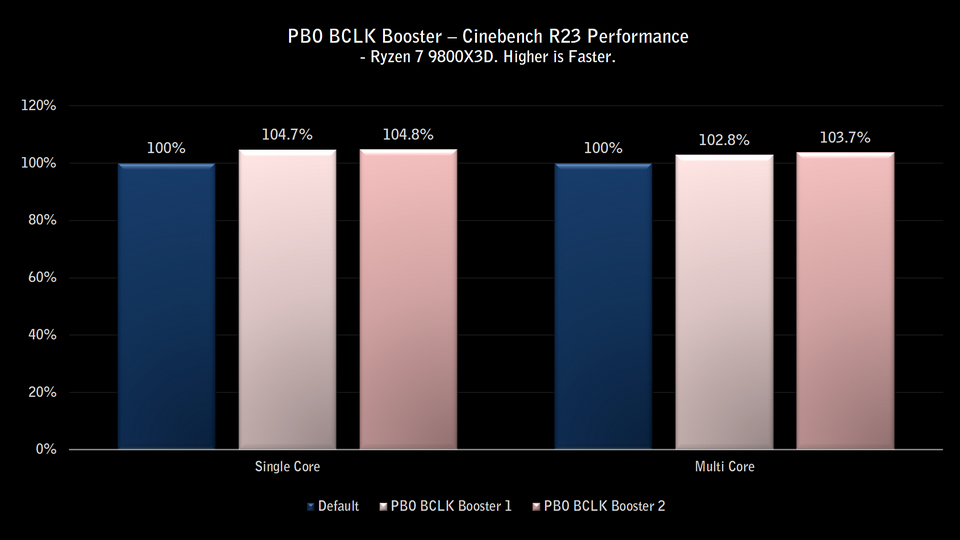
Cinebench Performance Test – 3–5% Gain on Ryzen 7 9800X3D
In real-world testing with the Ryzen 7 9800X3D, enabling PBO BCLK Booster delivers approximately 3-5% performance improvement in Cinebench R23.
High-Efficiency Mode – Better Memory Performance, Lower Latency
In addition to standard XMP and EXPO support, Click BIOS X also includes Memory Try It! and High-Efficiency Mode for memory overclocking and performance optimization, making it easy to optimize your memory for improved performance and lower latency.
Memory Try It!
- Function: Provides multiple frequency and timing profiles based on commonly available memory ICs, helping users quickly find the best settings for their memory.
- Benefits: No need to manually adjust complex memory timings. Users can select the most suitable profile to improve memory and gaming performance.
High-Efficiency Mode
- Function: Further optimizes memory timings to increase bandwidth and reduce latency. It offers four preset modes: Tightest / Tighter / Balance / Relax, allowing users to choose based on their memory’s overclocking capability.
- Benefits: Improved memory efficiency and lower latency through optimized settings.
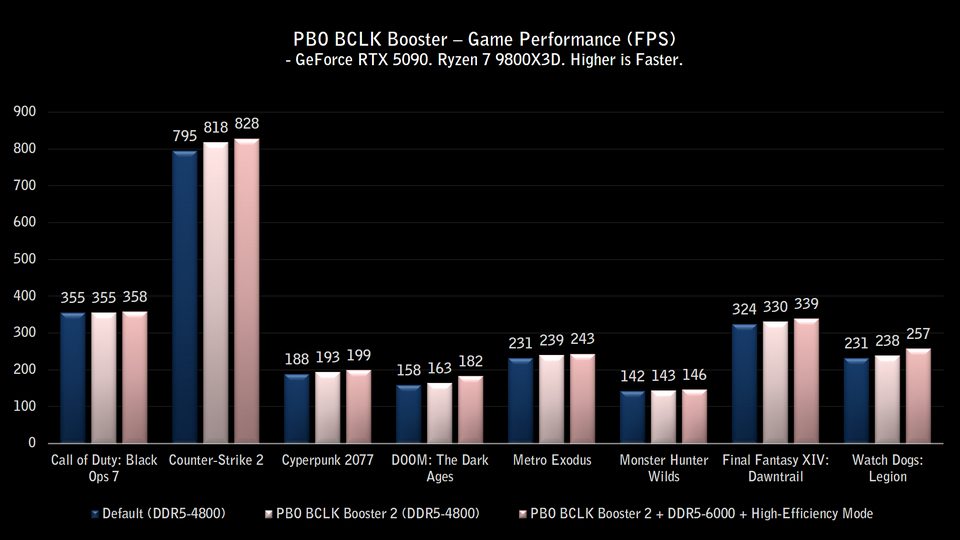
PBO BCLK Booster x High-Efficiency Mode – Up to 15% Gaming Performance Boost
Based on internal testing, using PBO BCLK Booster together with Memory Try It! (DDR5-6000 CL30) and High-Efficiency Mode can deliver up to 15% higher gaming performance in some titles at 1080p resolution, compared to default settings.
Note:
- Gaming performance may vary depending on system configuration.
- Performance gains will differ based on hardware setup and game title.
Test System Configuration
- CPU: AMD Ryzen 7 9800X3D
- Motherboard: MSI B850MPOWER
- Memory: Kingston FURY Beast DDR5-6000 16GB ×2
- Graphics Card: MSI GeForce RTX 5090 32G VANGUARD SOC
- CPU Cooler: MSI MPG CORELIQUID P13 360
- Power Supply: MSI MEG Ai1300P PCIE5
- Operating System: Microsoft Windows 11 25H2
- Game Settings: 1920×1080, Maximum Quality (Counter-Strike 2 set to High)
MSI X870E/X870/B850/B840 Gaming Motherboards:
https://www.msi.com/Landing/amd-am5-x870e-x870-b850-b840-ryzen-9000-x3d-best-ai-gaming-motherboard
https://www.msi.com/Landing/amd-am5-x870e-x870-b850-b840-ryzen-9000-x3d-best-ai-gaming-motherboard
MSI Liquid Cooling: https://www.msi.com/Liquid-Cooling
MSI Power Supply: https://www.msi.com/Power-Supply/